

MAKE ACCESSIBILITY THE DEFAULT IN CANVAS

Automated Scanning. Expert-led remediation. Faculty upskilling. All inside Canvas without adding to faculty’s workload.
Scan. Remediate. Upskill. Support.
Everything your institution needs in one platform
The ansrAccess® Tool:
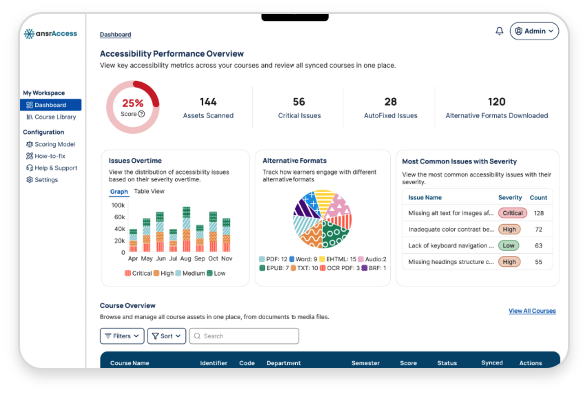
Real-time WCAG scanning, AI-powered AutoFix, and actionable accessibility reports within your Canvas workflows. Your faculty and instructors can identify and resolve issues in their own course content without switching platforms, learning any new systems, or submitting IT tickets.
Expert-Led Remediation:
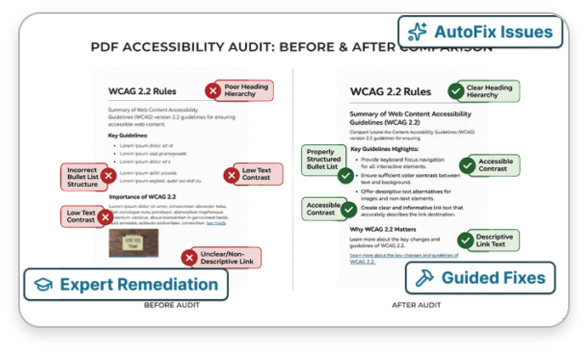
Remediate complex legacy content at scale, validating every fix against WCAG 2.2, with guaranteed turnaround times. Our team of accessibility specialists combines automation with human oversight to ensure high quality.
Faculty Upskilling:
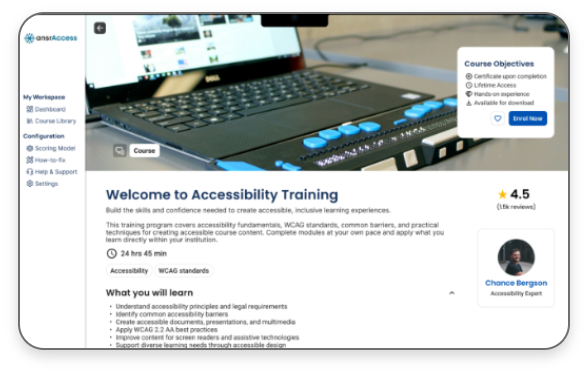
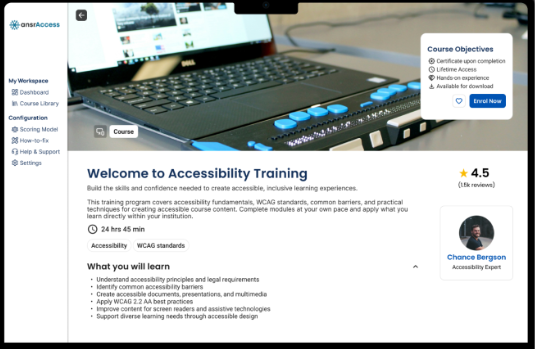
Role-specific training for faculty, instructional designers, and administrators so they can learn to add accessibility in the flow of their work. Your faculty don’t need to become accessibility experts, but they do need enough confidence to create accessible content.

AWARDS & RECOGNITION

ansrAccess IN ACTION
Whether you need automated scanning, expert-led remediation, role-based training, or all three — ansrAccess works across your content environment, fitting into the workflows your team already uses.
Scan & Score
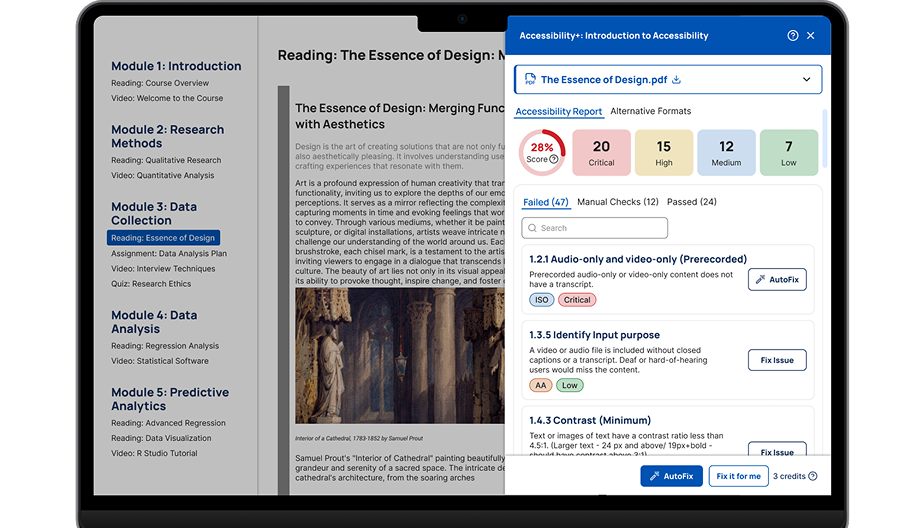
ansrAccess scans every page, file, and media item across your Canvas courses in real time. Issues are classified by severity — Critical, High, Medium, Low — against current WCAG and Level AA criteria, so your team knows exactly where to focus first.
Prioritize
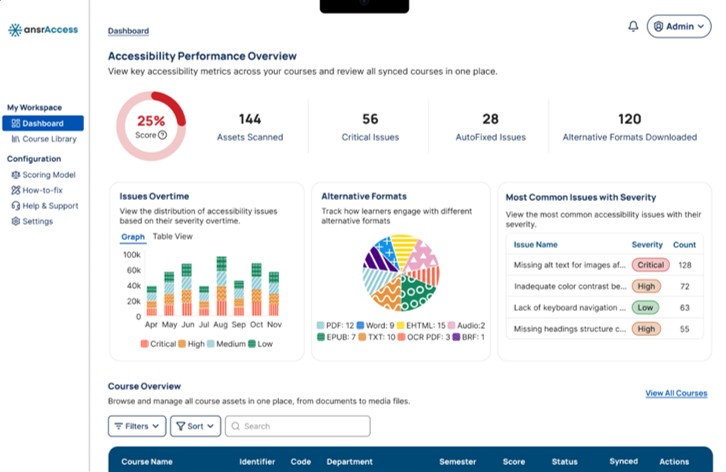
A severity-weighted accessibility health score and prioritized issue list surface the highest-impact problems first. Faculty see only the issues in their own courses. Administrators see institution-wide trends. Everyone works from the same point of reference.
AutoFix
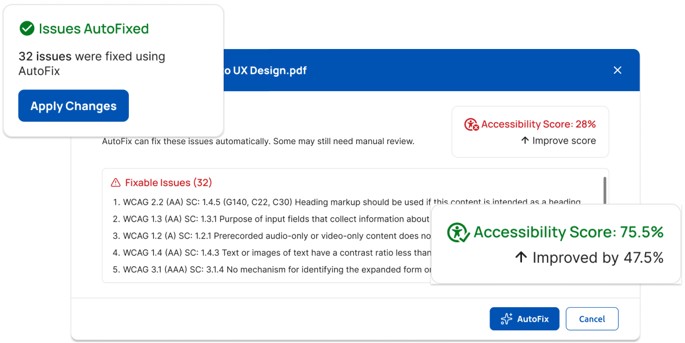
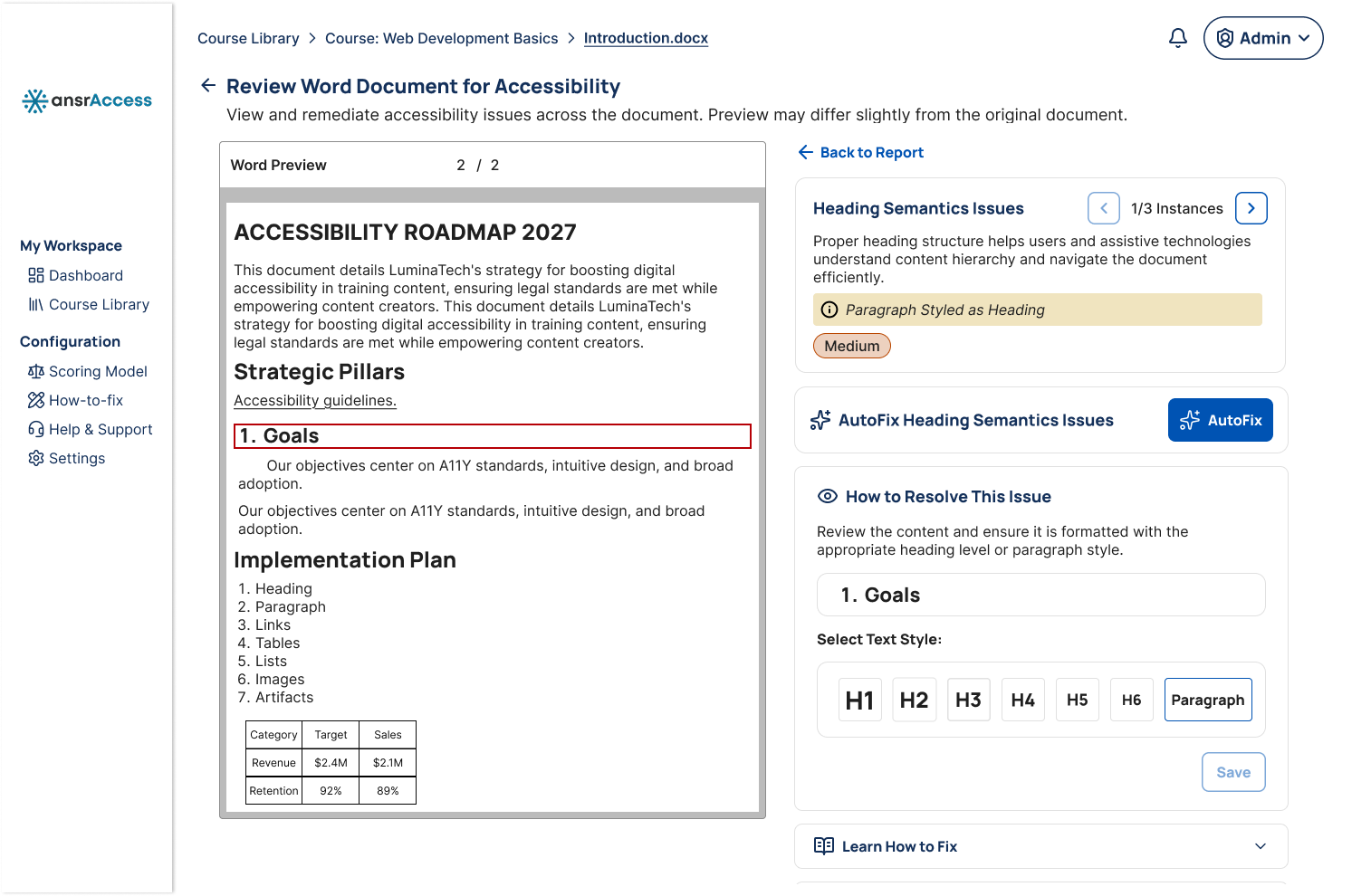
For standard issues — missing alt text, empty links, heading errors — AutoFix applies validated corrections in one click. For complex content — tagged PDFs, STEM documents, legacy media — certified experts take over. Faculty choose their path; both routes lead to accessible content.
Expert Remediation
For complex accessibility challenges, ansrAccess extends beyond automation with expert-led remediation support. Certified accessibility specialists handle advanced issues such as tagged PDFs, STEM content, multimedia accessibility, and legacy course materials.
Expanded Access
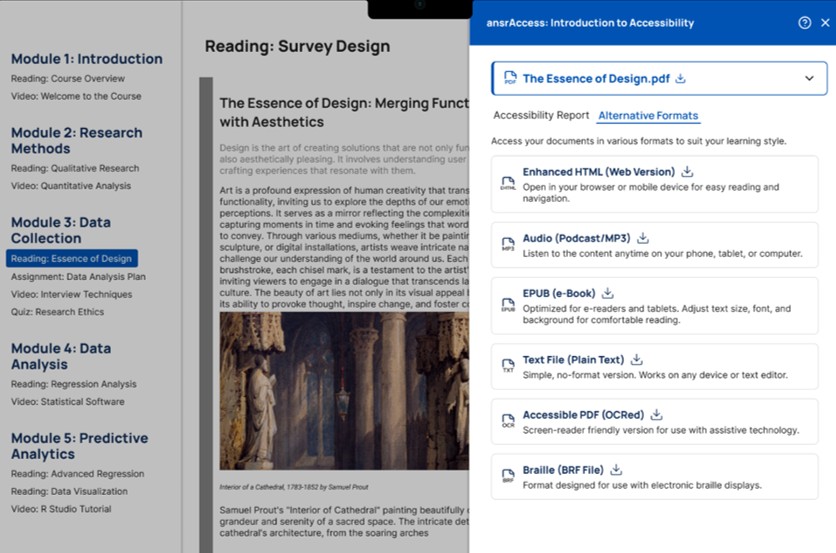
ansrAccess generates accessible alternative formats automatically — including tagged PDFs, HTML, EPUB, and MP3 audio — so students can engage with content in the format that works for them. There are no extra steps required for faculty and no additional accommodation requests for the disability support office.
Report and Improve
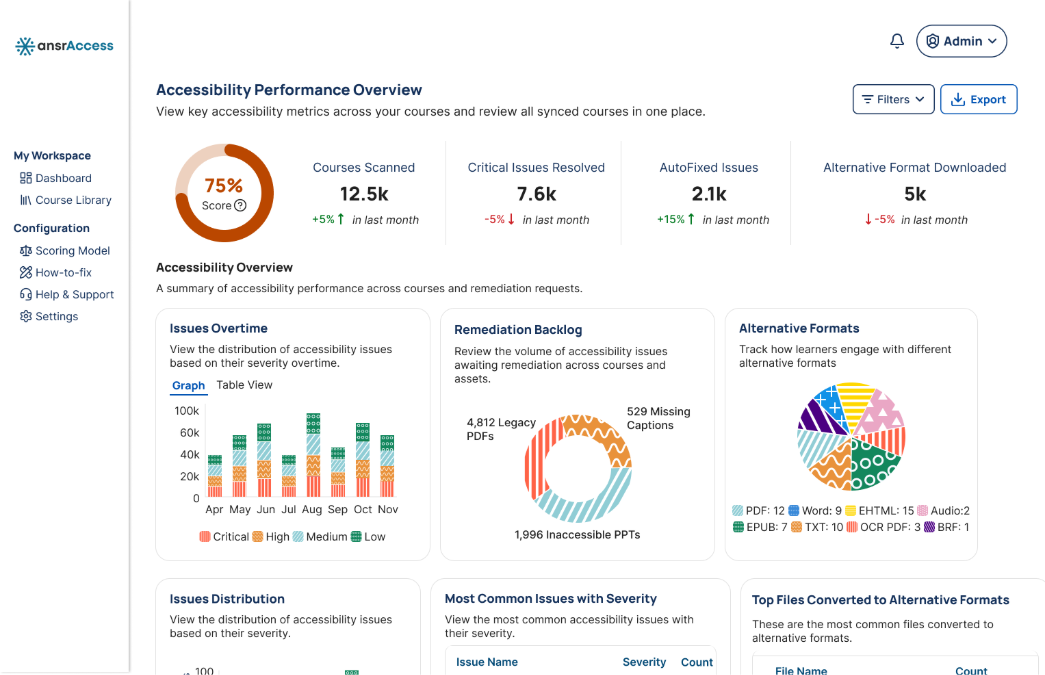
A live accessibility report tracks remediation progress across courses, departments, and campuses. Export compliance-ready documentation for audits, leadership reviews, or accreditation processes — at any time, for any period.
Upskill Your Faculty
Improvements to accessibility do not stop at remediation. ansrAccess helps faculty build lasting accessibility habits through role-based training, in-context guidance, and practical recommendations embedded directly into their workflow.
23+ Years
Designing
learning
experiences
200 +
Certified
accessibility
experts
ADA, Section 508 , Title II
Regulatory
coverage
SOC 2
Type 2
Security certifications
ISO 27001
Information security certification
23+ Years
Designing learning experiences
200 +
Certified accessibility experts
ADA, Section 508 , Title II
Regulator coverage
SOC 2
Type 2
Security certifications
ISO 27001
Information security certification
Frequently Asked Questions
ansrAccess combines automated accessibility audits, remediation workflows, expert human support, upskilling, and institutional reporting to help higher education institutions build more inclusive digital learning environments.
Who is ansrAccess designed for?
ansrAccess supports multiple stakeholders across higher education institutions, including:
- Faculty
- Instructional designers
- Accessibility teams
- LMS administrators
- Academic technology leaders
- Compliance and governance teams
- Institutional leadership
The platform is designed to help institutions scale accessibility sustainably across both new and legacy course content.
How does ansrAccess support accessibility compliance efforts?
ansrAccess is designed to support institutional accessibility initiatives aligned with WCAG 2.2 standards, Section 508 requirements, EN 301 549 standards, and evolving accessibility regulations.
The Accessibility Conformance Report (ACR) states that ansrAccess demonstrates conformance with WCAG 2.2 Levels A, AA, and AAA and reflects accessibility requirements associated with Section 508, ADA Title II accessibility rules and with the European Accessibility Act.
How is ansrAccess different from a basic accessibility checker?
Most accessibility tools stop at identifying problems. ansrAccess, however, combines automated scanning, remediation workflows, accessibility scoring, alternative format generation, institutional reporting, and human-supported remediation services within a single platform experience.
The solution is designed to support accessibility efforts across a wide range of content types, including PDFs, Word documents, PowerPoint files, HTML content, media assets, assignments, quizzes, discussion posts, and embedded content.
Does ansrAccess integrate with our existing Canvas environment?
Yes.
ansrAccess is designed to work natively within Canvas, allowing institutions to support accessibility workflows without disrupting existing faculty or instructional design processes.
The platform integrates directly into Canvas’ experience, so accessibility scanning, remediation support, and faculty guidance happen within the environment educators already use every day.
What types of content can ansrAccess scan and support?
ansrAccess supports a broad range of digital learning content, including:
- PDFs
- Word documents
- PowerPoint presentations
- HTML content
- Embedded content
- Media assets
- Assignments
- Quizzes
- Discussion posts
- Linked external resources
The platform is designed to support accessibility auditing and remediation workflows across institutional learning environments at scale.
Does ansrAccess support alternative content formats?
Yes.
The platform supports generation of alternative accessible formats, including HTML, EPUB, audio, electronic Braille, text-only versions, and accessible document outputs, depending on the source content and institutional workflows.
These capabilities are designed to support diverse learner preferences and Universal Design for Learning (UDL) initiatives
Can ansrAccess help with our legacy content backlog?
Yes.
Many institutions have years’ worth of inaccessible PDFs, presentations, scanned documents, and course materials across their LMS environments.
ansrAccess helps institutions prioritize and remediate legacy content through a combination of automated remediation workflows, bulk processing capabilities, and human expert support for more complex materials such as STEM content, tables, charts, and multimedia assets.
Does ansrAccess increase workload for faculty?
No.
The ansrAccess platform works directly within Canvas’s environment to provide automated scanning, accessibility scoring, remediation guidance, and in-context issue visibility. Faculty can review and address issues directly within existing course workflows without needing to adopt separate systems or processes.
For more advanced remediation needs, issues can be escalated to institutional accessibility teams or our remediation specialists, helping institutions reduce manual effort while improving accessibility coverage across course materials.
Can faculty access expert accessibility assistance for complex content?
Yes.
ansrAccess combines AI-supported remediation with human expertise. Where manual review or advanced remediation is required, institutions can route content to accessibility administrators, internal remediation teams, or our remediation specialists.
The remediation support model is designed to assist with complex accessibility needs, including STEM content, mathematical equations, charts, tables, multimedia assets, and advanced document structures.
How does ansrAccess handle data security and institutional privacy?
ansrsource maintains ISO/IEC 27001:2022 certification for information security management systems across its product development, maintenance, technical support, and software services operations, which covers ansrAccess.
The organization also maintains a SOC 2 Type 2 report covering controls relevant to security, confidentiality, and availability across supported software applications, including ansrAccess.
What is the DOJ Title II compliance deadline, and how does it apply to our institution?
The Department of Justice’s updated Title II ADA regulations establish new digital accessibility requirements for public higher education institutions and government entities.
Institutions are increasingly evaluating accessibility readiness across LMS platforms, instructional content, PDFs, multimedia assets, and digital learning workflows to support compliance efforts and improve equitable access for learners.
ansrAccess helps institutions proactively identify accessibility barriers, monitor accessibility trends, and support remediation efforts at scale through a combination of automation and human expertise.
What does onboarding look like?
Onboarding is designed to be collaborative, seamless, and institution-friendly.
Our team works closely with your stakeholders to configure LMS integrations, establish remediation workflows, align reporting structures, and support rollout planning for faculty and administrators.
Depending on institutional goals, onboarding may also include accessibility baseline assessments, pilot deployments, governance recommendations, and faculty enablement support
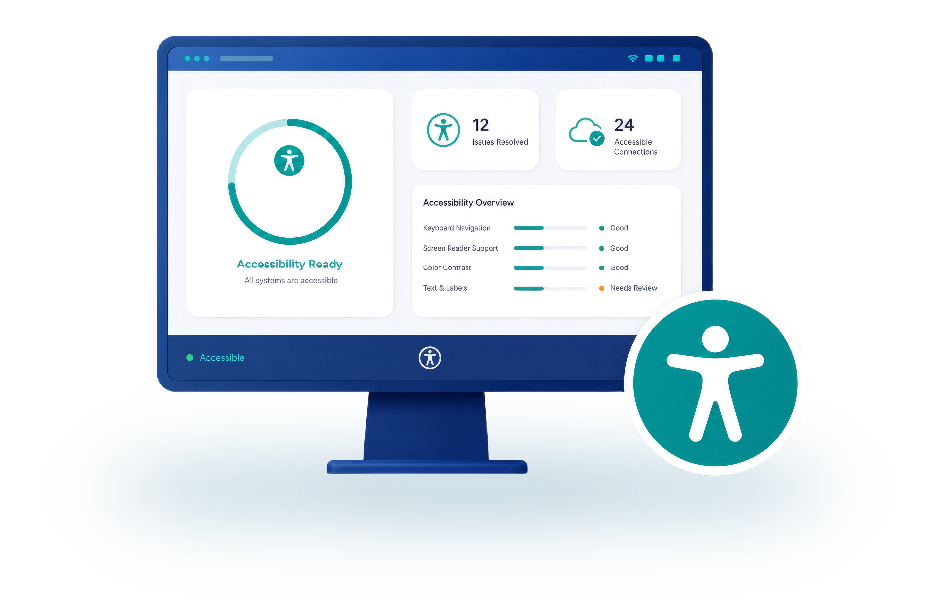
Ready to take the next step toward accessibility?
See how ansrAccess works within your existing Canvas workflows and helps you build better learning experiences